> ## Documentation Index
> Fetch the complete documentation index at: https://docs.personal.ai/llms.txt
> Use this file to discover all available pages before exploring further.
# AI Message
> Send a message to your AI and receive a response
## Overview
API endpoint for interacting with your AI through messages. This endpoint allows you to have conversations with your AI and receive responses based on your AI's training.
## Authorization
Your Personal AI API key
## Headers
Must be set to application/json
## Body
Message to send to your AI for a response
```json Example theme={null}
"What is an SLM?"
```
Message to add additional context to the AI for a response (Similar to Reply function)
```json Example theme={null}
"Context": "Reply in one sentence."
```
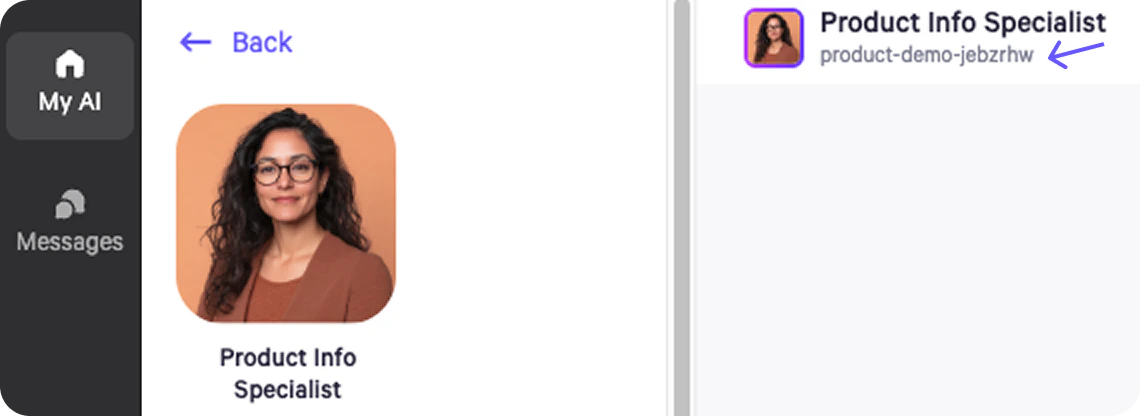
The hyphenated text below the AI's name when clicked into a Persona.
 ```json Example theme={null}
"DomainName": "product-demo-jebzrhw"
```
Name of the user sending the request
```json Example theme={null}
"UserName": "Leila"
```
Use the same sessionId to continue conversation on that session
```json Example theme={null}
"SessionId": "d5e9f208-937c-4a9c-92bf-5fb90ce68ff6"
```
Name of the document you want to refer to in your AI's Upload Library. This functions in the same way as the colon function does in the Personal AI platform.
```json Example theme={null}
"Event": "How to train your AI"
```
Name of the source app of the inbound message, required if using with triggers
```json Example theme={null}
"SourceName": "slack"
```
Flag to also add the user message (Text) to memory. Defaults to false if nothing is entered.
```json Example theme={null}
"is_stack": true
```
Flag to create a copilot message for the AI. Defaults to false if nothing is entered.
```json Example theme={null}
"is_draft": true
```
```json Example theme={null}
{
"Text": "What is an SLM?",
"Context": "Reply in one sentence.",
"DomainName": "product-demo-jebzrhw",
"UserName": "Leila",
"SessionId": "d5e9f208-937c-4a9c-92bf-5fb90ce68ff6",
"Events": "How to train your AI",
"SourceName": "slack",
"is_draft": true,
"is_stack": true,
"Metadata": {
"key": "value"
}
}
```
***
## Example Responses
The AI's response message
Confidence score of the AI's response
Session identifier for the conversation
```json Example Success Response theme={null}
{
"ai_message": "SLMs or PLMS PLMs are artificial intelligence (AI) models capable of understanding and generating information within the domain of an individual user. ",
"ai_score": 47.18898852308854,
"ai_name": "AI Name",
"ai_picture": "https://example.com/picture.jpg",
"SessionId": "d5e9f208-937c-4a9c-92bf-5fb90ce68ff6",
"source_app": "api"
}
```
```json Example Error Response theme={null}
{
"detail": "AI message api unauthorized."
}
```
***
## Examlpe cURL
```bash cURL theme={null}
curl --location 'https://api.personal.ai/v1/message' \
--header 'Content-Type: application/json' \
--header 'x-api-key: ' \
--data '{
"Text": "What is an SLM?",
"DomainName": "product-demo-jebzrhw",
"UserName": "Leila",
"SourceName": "slack",
"is_draft": true,
"SessionId": "d5e9f208-937c-4a9c-92bf-5fb90ce68ff6",
"Events": "How to train your AI"
}'
```
***
## Error Codes
| Code | Description |
| ---- | ---------------------------------------------------------------- |
| 403 | Forbidden - Check that API key is invalid |
| 503 | Threshold Failure - Generated AI message is below user threshold |
```json Example theme={null}
"DomainName": "product-demo-jebzrhw"
```
Name of the user sending the request
```json Example theme={null}
"UserName": "Leila"
```
Use the same sessionId to continue conversation on that session
```json Example theme={null}
"SessionId": "d5e9f208-937c-4a9c-92bf-5fb90ce68ff6"
```
Name of the document you want to refer to in your AI's Upload Library. This functions in the same way as the colon function does in the Personal AI platform.
```json Example theme={null}
"Event": "How to train your AI"
```
Name of the source app of the inbound message, required if using with triggers
```json Example theme={null}
"SourceName": "slack"
```
Flag to also add the user message (Text) to memory. Defaults to false if nothing is entered.
```json Example theme={null}
"is_stack": true
```
Flag to create a copilot message for the AI. Defaults to false if nothing is entered.
```json Example theme={null}
"is_draft": true
```
```json Example theme={null}
{
"Text": "What is an SLM?",
"Context": "Reply in one sentence.",
"DomainName": "product-demo-jebzrhw",
"UserName": "Leila",
"SessionId": "d5e9f208-937c-4a9c-92bf-5fb90ce68ff6",
"Events": "How to train your AI",
"SourceName": "slack",
"is_draft": true,
"is_stack": true,
"Metadata": {
"key": "value"
}
}
```
***
## Example Responses
The AI's response message
Confidence score of the AI's response
Session identifier for the conversation
```json Example Success Response theme={null}
{
"ai_message": "SLMs or PLMS PLMs are artificial intelligence (AI) models capable of understanding and generating information within the domain of an individual user. ",
"ai_score": 47.18898852308854,
"ai_name": "AI Name",
"ai_picture": "https://example.com/picture.jpg",
"SessionId": "d5e9f208-937c-4a9c-92bf-5fb90ce68ff6",
"source_app": "api"
}
```
```json Example Error Response theme={null}
{
"detail": "AI message api unauthorized."
}
```
***
## Examlpe cURL
```bash cURL theme={null}
curl --location 'https://api.personal.ai/v1/message' \
--header 'Content-Type: application/json' \
--header 'x-api-key: ' \
--data '{
"Text": "What is an SLM?",
"DomainName": "product-demo-jebzrhw",
"UserName": "Leila",
"SourceName": "slack",
"is_draft": true,
"SessionId": "d5e9f208-937c-4a9c-92bf-5fb90ce68ff6",
"Events": "How to train your AI"
}'
```
***
## Error Codes
| Code | Description |
| ---- | ---------------------------------------------------------------- |
| 403 | Forbidden - Check that API key is invalid |
| 503 | Threshold Failure - Generated AI message is below user threshold |