> ## Documentation Index
> Fetch the complete documentation index at: https://docs.personal.ai/llms.txt
> Use this file to discover all available pages before exploring further.
# Toolbar
The document toolbar in Personal AI is designed to streamline your AI training workflows by offering powerful tools for reformatting content, assigning files to personas, and refining memory blocks directly from the editor. This guide outlines how to use each feature effectively.
 #### Toolbar Overview
You can access the document toolbar in two primary locations:
* Straight from the Upload Library or Memory Upload
* Within each uploaded document
These tools support core workflows such as formatting content for training, assigning documents to specific AI personas, and enhancing semantic accuracy.
#### Toolbar Overview
You can access the document toolbar in two primary locations:
* Straight from the Upload Library or Memory Upload
* Within each uploaded document
These tools support core workflows such as formatting content for training, assigning documents to specific AI personas, and enhancing semantic accuracy.
 #### Reformat Tool
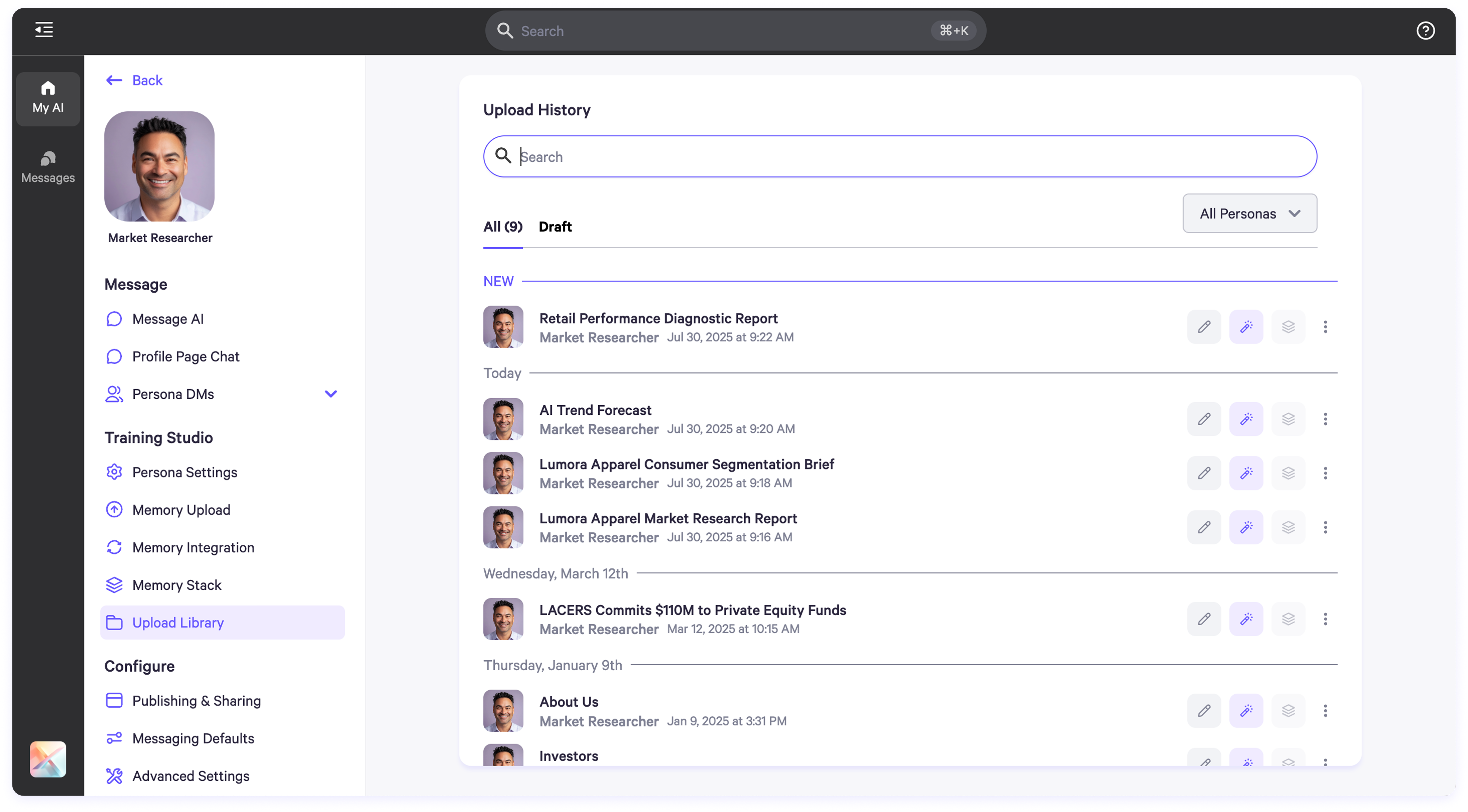
**Function:** Automatically structures raw content into clear, labeled memory blocks and Q\&A pairs.
**How to Use**:
1. Navigate to the **Memory Upload** or **Upload Library** section.
2. Locate the file and click the **purple wand icon** on the file's toolbar.
3. The file will be automatically reformatted—no need to open the text editor.
#### Reformat Tool
**Function:** Automatically structures raw content into clear, labeled memory blocks and Q\&A pairs.
**How to Use**:
1. Navigate to the **Memory Upload** or **Upload Library** section.
2. Locate the file and click the **purple wand icon** on the file's toolbar.
3. The file will be automatically reformatted—no need to open the text editor.
 **What It Does**:
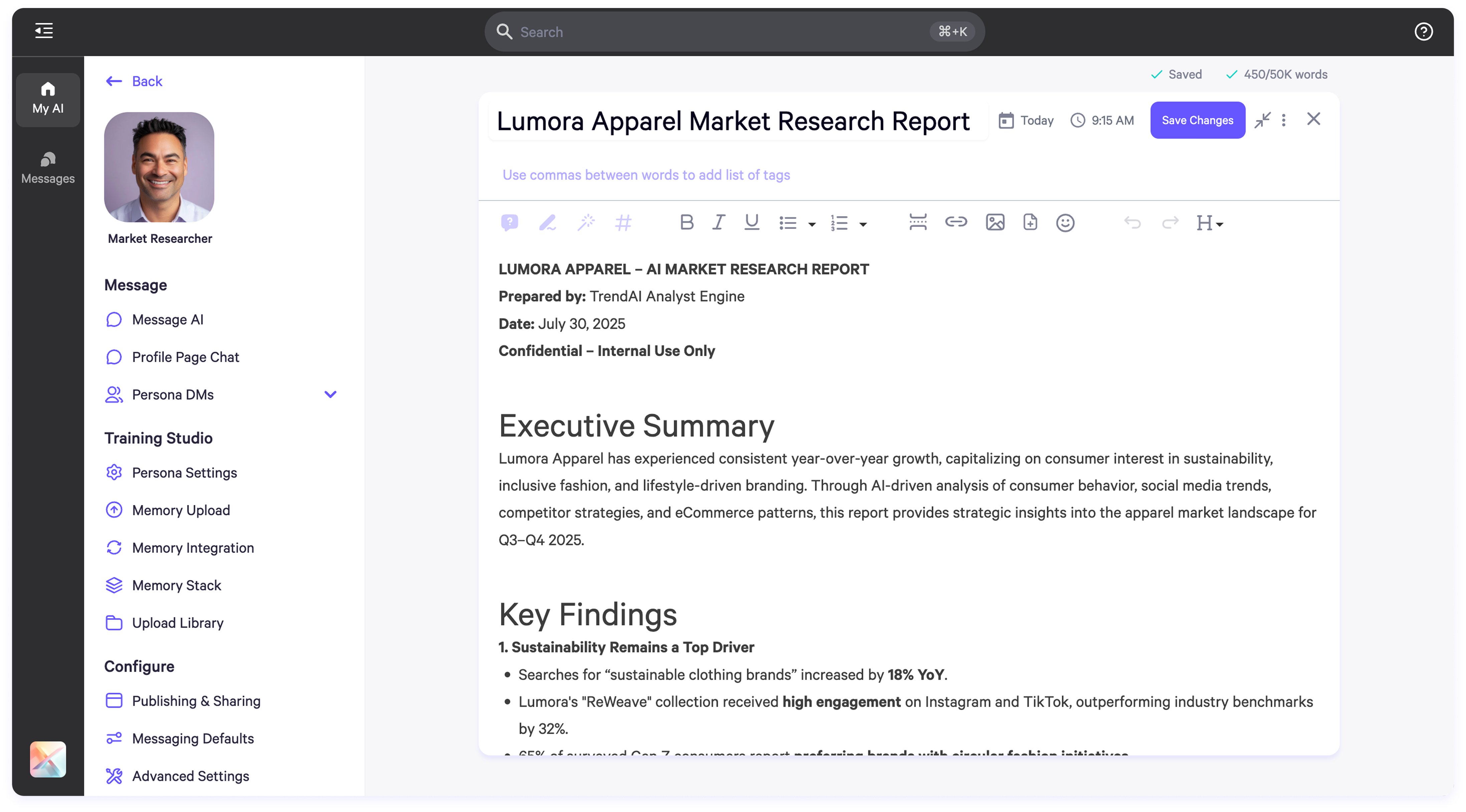
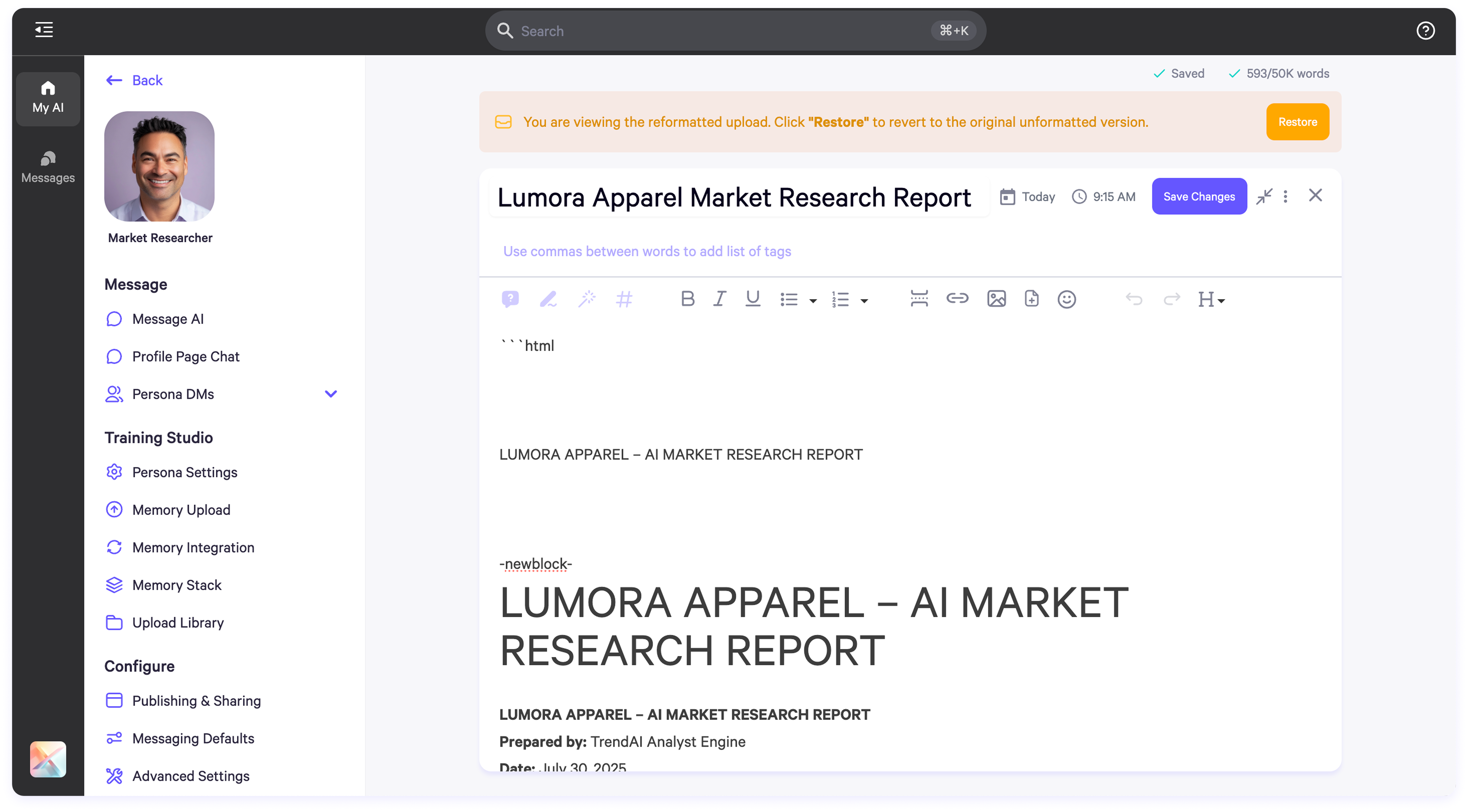
* Transforms free-form content into structured memory blocks.
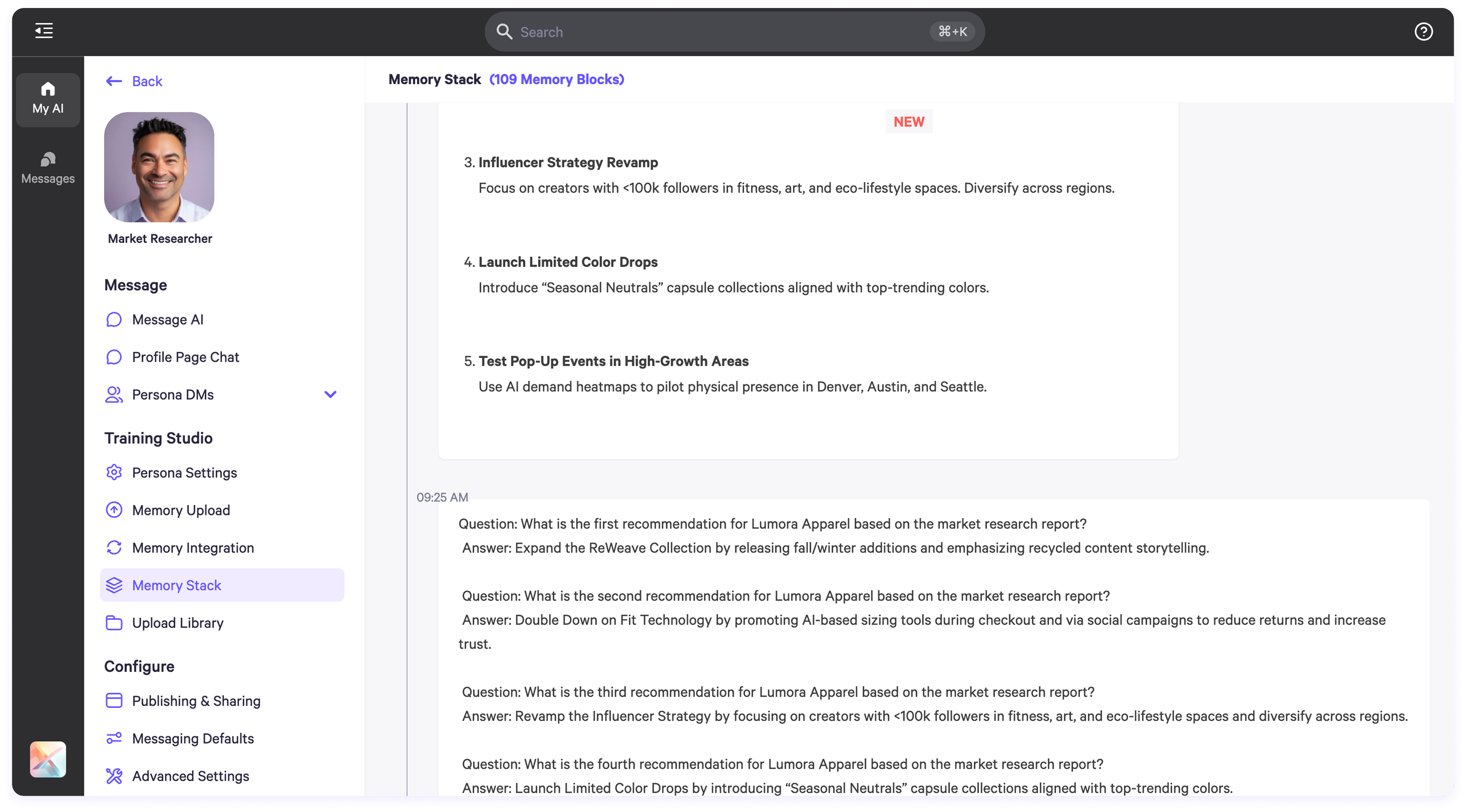
* Organizes data into Q\&A pairs where possible.
* Displays a confirmation banner with the option to revert changes.
**What It Does**:
* Transforms free-form content into structured memory blocks.
* Organizes data into Q\&A pairs where possible.
* Displays a confirmation banner with the option to revert changes.
 * Updated structure is reflected in the Memory Blocks view.
 #### Assign to Persona
**Function:** Link uploaded files to one or more AI personas in your workspace.
#### Assign to Persona
**Function:** Link uploaded files to one or more AI personas in your workspace.
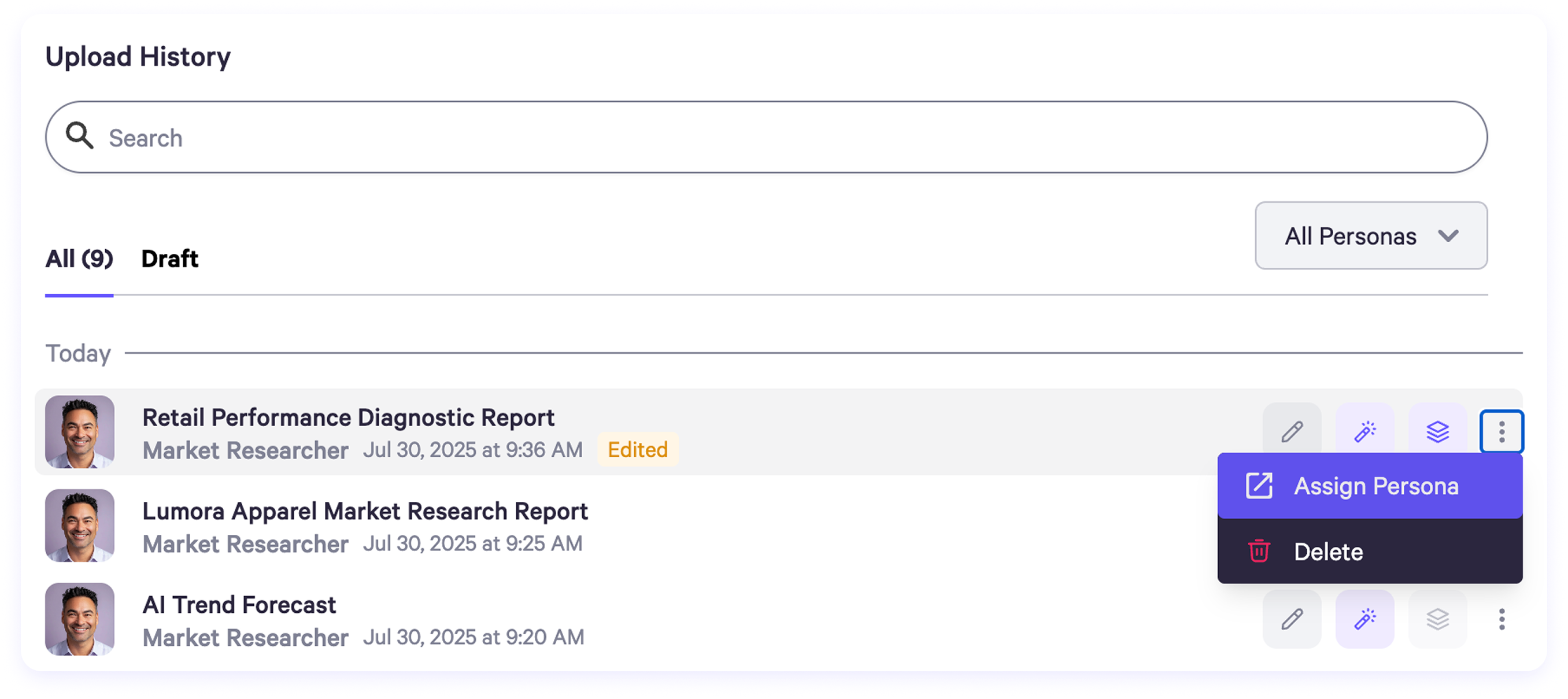 **How to Use**:
1. In the document toolbar, click the **three-dot menu** on the right.
2. Select **Assign Persona**.
3. Choose one or more personas to associate with the file.
**How to Use**:
1. In the document toolbar, click the **three-dot menu** on the right.
2. Select **Assign Persona**.
3. Choose one or more personas to associate with the file.
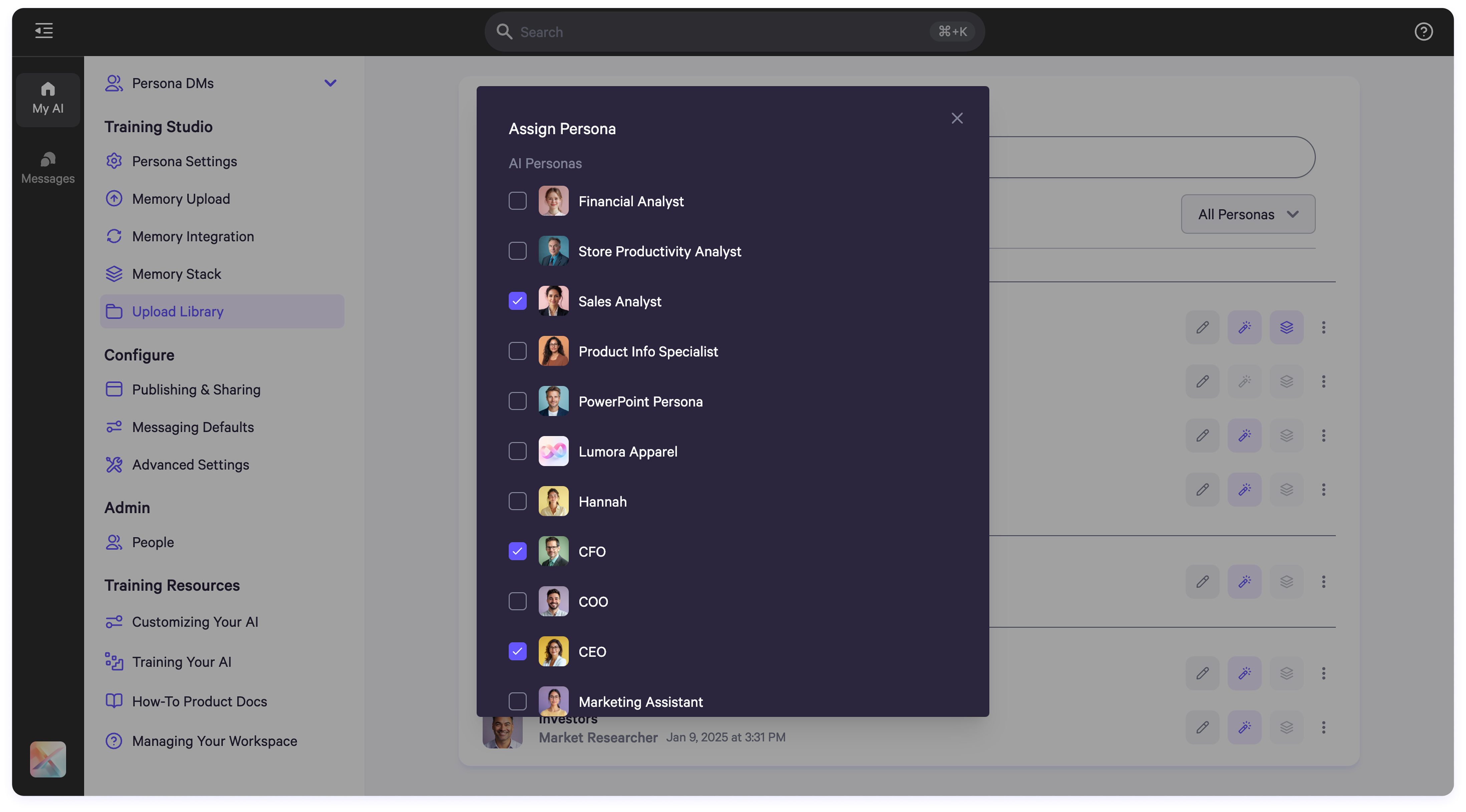 **What It Does**:
* Enables persona-specific AI training.
* Ensures content is routed to the correct AI profile for memory indexing.
#### In-Editor AI Training Tools
The in-document editor includes a toolbar for AI-powered tools that assist in rephrasing, cleaning, tagging, and structuring content for memory optimization.
**Accessing the Tools**
**How to Use**:
1. Go to **Persona Settings** > **Memory Upload** or **Upload Library**.
2. Open a file to view it in the document editor.
3. The AI tools toolbar is located at the top of the editor.
4. Highlight any portion of text to activate tools.
#### Available Tools
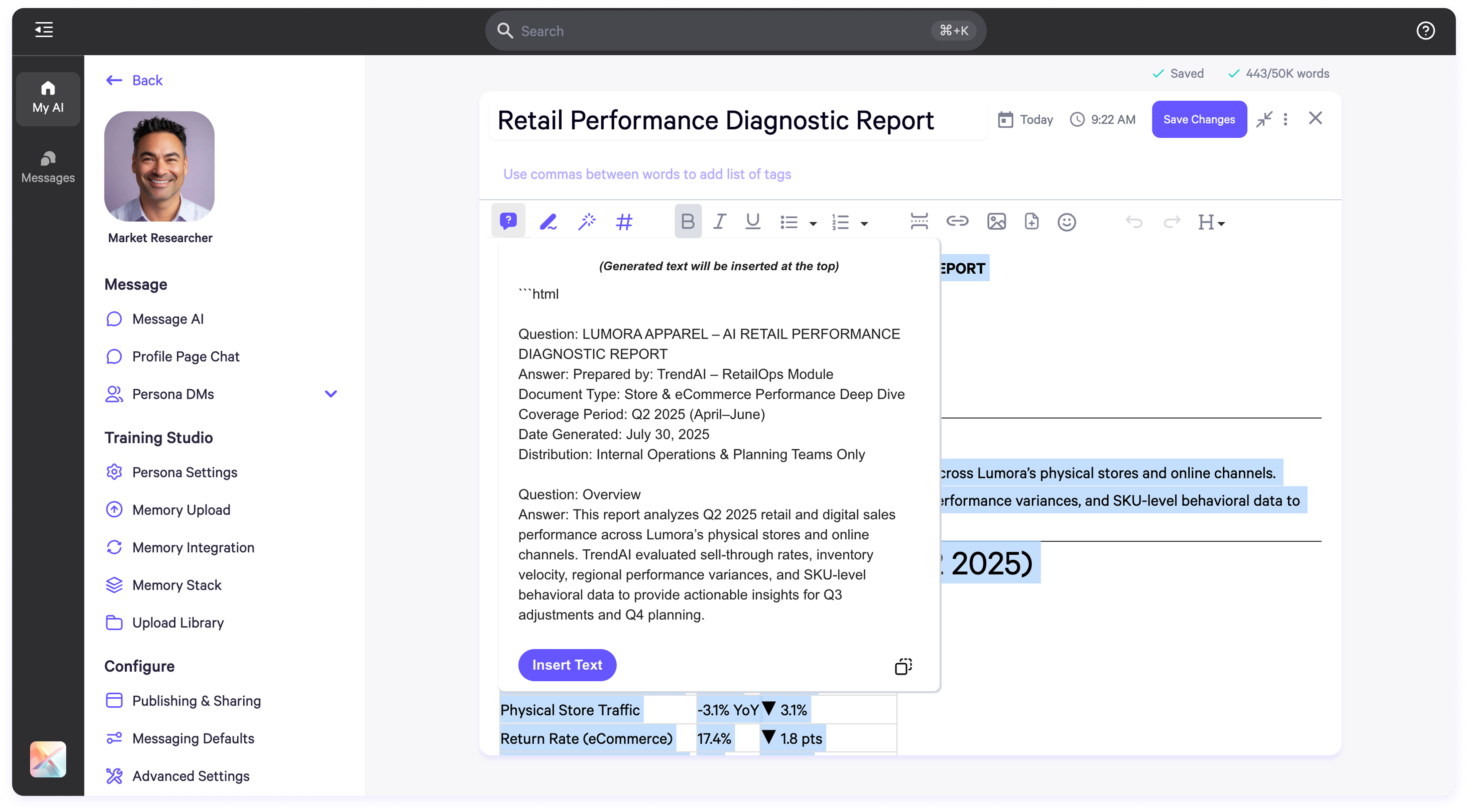
**1. Generate Q\&A**
**Purpose:** Create question-and-answer pairs from selected content.
* **How to Use:** Highlight text > Click the **Q\&A icon**.
* **Output:** Preview displays generated Q\&As.
* **Actions:** Click **Add Suggestion** to append, or **Copy** to clipboard.
**What It Does**:
* Enables persona-specific AI training.
* Ensures content is routed to the correct AI profile for memory indexing.
#### In-Editor AI Training Tools
The in-document editor includes a toolbar for AI-powered tools that assist in rephrasing, cleaning, tagging, and structuring content for memory optimization.
**Accessing the Tools**
**How to Use**:
1. Go to **Persona Settings** > **Memory Upload** or **Upload Library**.
2. Open a file to view it in the document editor.
3. The AI tools toolbar is located at the top of the editor.
4. Highlight any portion of text to activate tools.
#### Available Tools
**1. Generate Q\&A**
**Purpose:** Create question-and-answer pairs from selected content.
* **How to Use:** Highlight text > Click the **Q\&A icon**.
* **Output:** Preview displays generated Q\&As.
* **Actions:** Click **Add Suggestion** to append, or **Copy** to clipboard.
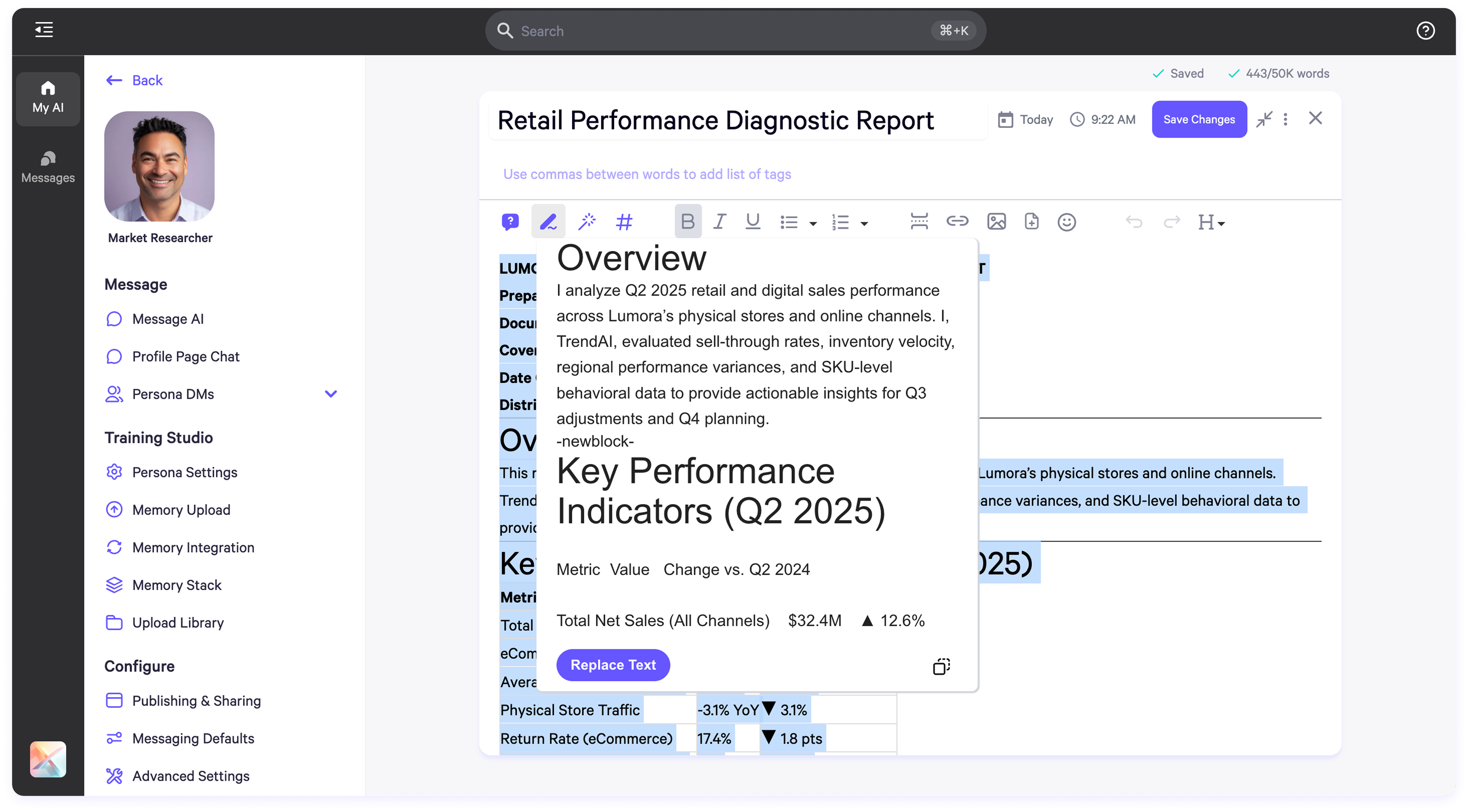
 **2. Rephrase to First Person**
**Purpose:** Rewrite text in the first-person voice for personalized AI training.
* **How to Use:** Highlight text > Click the **first-person icon**.
* **Output:** Preview shows a rewritten version.
* **Actions:** Append to the document or copy as needed.
**2. Rephrase to First Person**
**Purpose:** Rewrite text in the first-person voice for personalized AI training.
* **How to Use:** Highlight text > Click the **first-person icon**.
* **Output:** Preview shows a rewritten version.
* **Actions:** Append to the document or copy as needed.
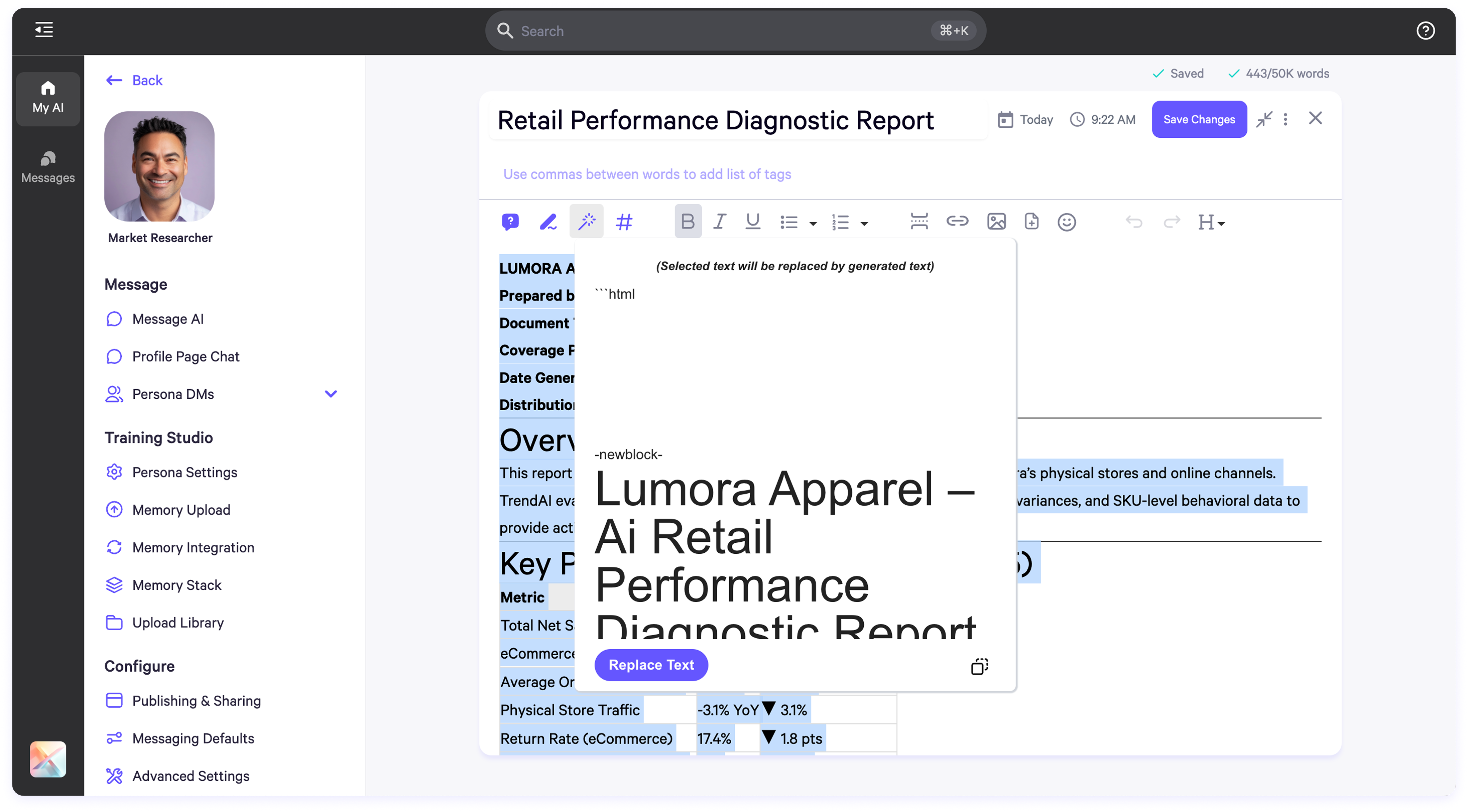
 **3. Clean Text**
**Purpose:** Standardize formatting, correct grammar, and remove unwanted characters.
* **How to Use:** Highlight text > Click the **Clean Text icon**.
* **Output:** Cleaned version appears in preview.
* **Actions:** Append or copy cleaned text.
**3. Clean Text**
**Purpose:** Standardize formatting, correct grammar, and remove unwanted characters.
* **How to Use:** Highlight text > Click the **Clean Text icon**.
* **Output:** Cleaned version appears in preview.
* **Actions:** Append or copy cleaned text.
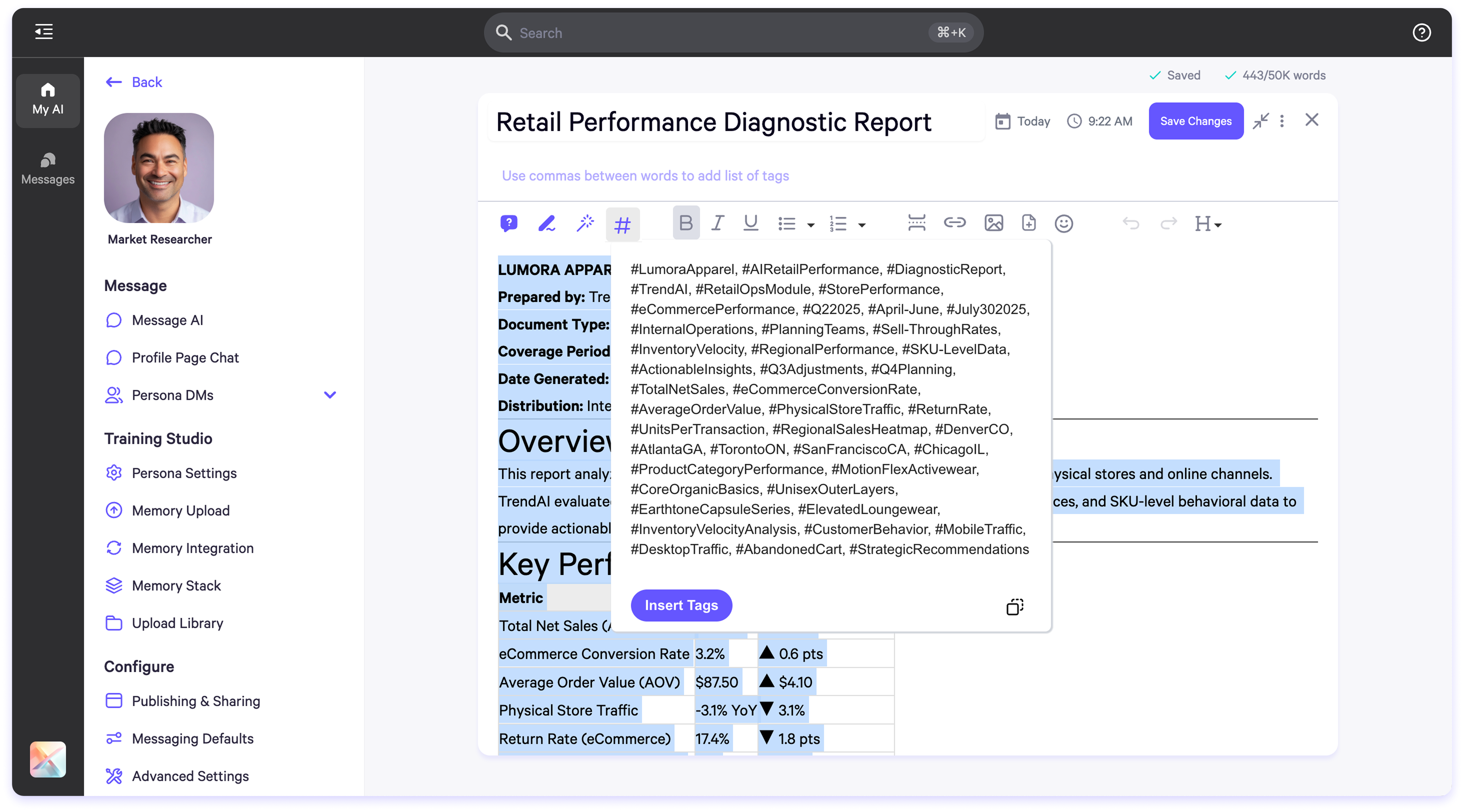
 **4. Generate Hashtags**
**Purpose:** Add tags to improve memory indexing and AI search capabilities.
* **How to Use:** Highlight text > Click the **Hashtag icon**.
* **Output:** Suggested tags appear in preview.
* **Actions:** Accept to add tags at the top of the document.
**4. Generate Hashtags**
**Purpose:** Add tags to improve memory indexing and AI search capabilities.
* **How to Use:** Highlight text > Click the **Hashtag icon**.
* **Output:** Suggested tags appear in preview.
* **Actions:** Accept to add tags at the top of the document.
 #### Summary
The document toolbar and in-editor tools are essential components for refining your content and training more accurate, persona-specific AI models. Whether you're cleaning imported data, generating structured Q\&A, or assigning files to personas, these features help accelerate your workflow and increase training precision.
#### Summary
The document toolbar and in-editor tools are essential components for refining your content and training more accurate, persona-specific AI models. Whether you're cleaning imported data, generating structured Q\&A, or assigning files to personas, these features help accelerate your workflow and increase training precision.